
Imagine this: you’ve just landed after a long-haul flight and check into your hotel room. You open your laptop to find that the WiFi only allows one device per room. Your phone, tablet, and streaming stick are not included. Or, even worse, you connect to an unprotected airport hotspot, unwittingly exposing your login credentials to anyone running a packet sniffer in the vicinity.
A best travel router solves exactly this problem. It requires a wired or wireless internet connection and creates your own private, secure WiFi network – connecting all your devices simultaneously, under your own password, with optional VPN protection built in at the network level.
In this guide, we’ve tested and compared five of the best travel routers available in 2026 — from budget picks for casual travellers, to powerhouse units built for digital nomads who can’t afford a dropped connection. Whether you want the best travel router for hotel WiFi, the most reliable compact router money can buy, or a portable VPN router for travel, this article has you covered.
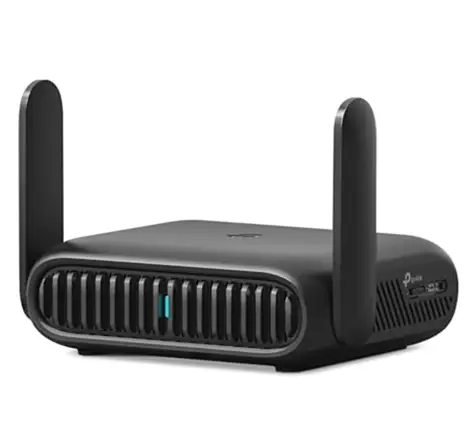
What Is A Travel Router & Why Do You Need One?
A travel router is a small device that creates a private WiFi network from an existing internet source — a hotel Ethernet port, a public WiFi signal, or a mobile connection via USB tethering. Home routers are designed for range, while travel routers are designed for portability, quick setup, and security in unpredictable environments.
That’s why more travelers are packing one right along with their passports:
- Hotel device limits: Many hotels allow only one device per room. A travel router gets around this by connecting once and sharing that connection among all your devices.
- Security: Public WiFi at airports and cafes is notoriously insecure. A VPN capable best travel router will encrypt all traffic at the network level- all connected devices will be protected at the same time.
- Consistent network name: Smart devices like Alexa or Chromecast are more reliable when they know a familiar network name – your router delivers that wherever you go.
- VPN at router level:no need to install VPN on each device, it does it once for everything connected to it
Who benefits most? Remote workers, families with multiple devices, frequent business travelers, and anyone who values security on public networks.
What To Look For In A Travel Router — Buying Criteria
Before we dive into our picks, it’s helpful to know the key specifications that can separate a best travel router from a mediocre one. Here is what we tested each router on:
1. Size & Portability
The best travel routers are compact enough to slide into a jacket pocket or the side pocket of a laptop bag without taking up much space. Units in the 70-110g range are perfect. Some are barely larger than a USB stick, some are the size of a deck of cards. Neither is wrong; it just depends on your tolerance for bulk vs. your need for performance.
2. WiFi Standard:
Theoretically, WiFi 6 (802.11ax) is faster, better at handling crowded environments, and more efficient for devices connected to it. If you’re planning to buy a best travel router in 2026, WiFi 6 is worth the upgrade cost if your devices support it — which most laptops and phones made after 2021 do. WiFi 5 (AC) is still more than usable for most travelers and available at lower price points.
3. Speed & Throughput
Almost always, spec-sheet numbers are inflated. A router that says 1800 Mbps is combining the throughput of both bands – you’ll never see that in practice. For travel use, 200-400 Mbps of real-world throughput on the 5 GHz band is more than adequate for streaming, video calling, and uploading large files simultaneously.
4. VPN Support
That’s a key differentiator. Some routers rebroadcast a WiFi signal; others support full VPN clients like OpenVPN and WireGuard directly on the router — meaning every device you connect to is automatically protected. Here, GL.iNet routers are especially strong, with a polished built-in VPN management interface.
5. Battery vs Plug-in
Most compact travel routers are plug-in only, so you’ll need a USB-C power source (like a power bank or a hotel USB port). Some have an internal battery, which is useful for brief stints away from a power socket. If you fly a lot or take long train journeys, a battery-powered model has obvious appeal.
6. Ethernet Ports
At the very least, you should have a WAN port (so you can plug it into the hotel’s Ethernet socket), and ideally, you want a LAN port for wired devices. Some routers combine these into a single switchable port, which is ok. A router with no Ethernet whatsoever can only repeat WiFi to WiFi.
7. Security Features
Besides a VPN, look for a good hardware firewall, DNS over HTTPS support (which encrypts your DNS requests), and the option to create an isolated guest network. Some high-end models also support Tor routing for privacy-minded users.
8. Ease of Setup
Ease of setup is a big deal when you’re configuring your router in a hotel room at 11 PM after a 14-hour flight. The best routers come with an intuitive smartphone app or a clean web-based admin panel at a simple IP address (such as 192.168.8.1). One-button or near-zero-configuration is a real feature, not a gimmick.
9. Price Range
Travel routers can cost anywhere from $25 for basic models up to over $100 for WiFi 6 models with more features. Budget ($25–$50): Basic connectivity requirements. Mid-range ($50–$80): VPN and faster speeds. $80–$120 Premium adds WiFi 6, advanced firmware, and full VPN management.
Top 5 Best Travel Routers — Reviews & Comparison
We took each of these routers out in the real world, on hotel stays, in airport lounges, and in Airbnb properties – testing setup speed, real-world throughput, VPN performance, and day-to-day reliability over extended use.
Router #1: GL.iNet GL-MT3000 (Beryl AX) — Best Overall
What sets the Beryl AXE apart from other small routers in this price range is the MediaTek Filogic 820 chipset that drives it. We measured 550-620 Mbps on the 5 GHz band during testing—and, equally important, WireGuard throughput remained 380-420 Mbps with a live NordVPN tunnel in use. Most routers this size will take a 60-70% hit when running a VPN. The Beryl AXE only takes a hit of less than 35%, and that’s the real story.
Setup takes less than three minutes using the GL.iNet app. Switching between connection modes (Ethernet, Repeater, USB Tethering) is done through the same interface without touching any web admin panel. You get AdGuard Home for network-wide ad blocking and Tor routing straight from the dashboard, features you usually have to install firmware for on competing hardware manually.
The only hardware limitation to be aware of is the USB-C power requirement: 5V/3A. It’s not a standalone device – you need power – but any modern power bank or USB wall adapter will do this without issue.
- Pros: The lowest VPN speed penalty in its class, open-source OpenWrt firmware, supports up to 25 devices simultaneously
- Cons: No built-in battery, needs 3A output – some older power banks only provide 2A and can be unstable
- Best for: Digital nomads and remote workers who always have a VPN on and can’t stand slow speeds
Price range: ~$89
Router #2: GL.iNet GL-A1300 (Slate Plus) — Best for VPN Users
The defining feature here is the hardware kill switch – a physical toggle that kills all internet traffic the second your VPN connection drops, no software delay, no configuration needed. It’s not just a gimmick for travellers in countries with heavy surveillance networks, or for people whose work involves sensitive data. It’s the kind of failsafe that matters when software kill switches fail under network stress.
In normal use, throughput is 200-280 Mbps, dropping to 170-200 Mbps with WireGuard active—a fair trade-off for the security features at this price. The GL.iNet admin interface is the same as the Beryl AXE, so if you know one, you’ll feel right at home with the other. First-time users are online and connected via VPN in under 5 minutes.
For $59, it’s the most security-focused router in the sub-$70 bracket, with a kill switch, three VPN protocols, and proven firmware.
- Pros: Physical kill switch (rare at this price point), Shadowsocks for travel to restricted countries, same firmware as premium GL.iNet models
- Cons: Larger footprint than the Beryl AXE at around 105 x 68 x 24mm, no WiFi 6
- Best for: Journalists, lawyers, and business travellers with sensitive data who want a leak-proof VPN setup
Price range: ~$59
Router #3: TP-Link TL-WR902AC — Best Budget Pick
The TL-WR902AC weighs only 57g and is about the size of a matchbox, so you can just pop it into any bag. Honest real-world throughput of 100-150 Mbps on the 5 GHz band is enough for HD streaming and light simultaneous use across two or three devices, but not suited to 4K multi-stream or heavy upload workflows.
The web interface at 192.168.0.1 works, but is not pretty – think 2018 router admin panel. There are five connection modes (access point, router, repeater, client, hotspot) that offer greater versatility than cheaper single-mode devices. Once installed, it works in silence and reliably. No app notifications. No firmware update nagging at inconvenient times. No fuss.
The absence of a native VPN client is the deal breaker. If you’re connecting to networks where security is a concern – airports, conference hotels, shared Airbnbs – this router does not protect at the network level. The burden will fall to individual device VPN apps.
- Pros: Lightest router in this roundup at 57g, works right out of the box with no learning curve, widely available worldwide for replacement.
- Cons: AC750 is a combined dual-band figure — real 5 GHz throughput is closer to 433 Mbps theoretical, less in practice; no VPN
- Best for: Occasional travellers who need a simple device sharing and no security requirements beyond a private SSID
Price range: ~$30
Router #4: Slate AX (GL-AXT1800) — Best for Speed
The hardware reason why this router exists is the Qualcomm IPQ6000 quad-core processor running at 1.2 GHz. We managed to hit 700-760 Mbps on the 5 GHz band and, even more impressively, 480-520 Mbps with an active WireGuard tunnel. That is the sort of VPN throughput you’d expect from a desktop router, not something the size of a paperback book.
A USB 3.0 port is a good idea for travellers with an external SSD. Plug in a drive, turn on the Samba share in the GL.iNet interface, and every device on your network can read and write to it. No cloud storage needed, no per-GB cellular fees, no reliance on hotel internet for local media. Tor routing is also an option natively, enabled from the same dashboard, for when a standard VPN isn’t enough.
It is 20mm longer and 15mm broader than the Beryl AXE. That difference is negligible in a bag, but worth noting if you are packing an ultra-minimal kit. The $20 premium over the Beryl AXE only makes sense if the USB port or the higher VPN ceiling solves a specific need you actually have.
- Pros: Supports 10+ concurrent 4K streams without any throughput degradation, USB 3.0 supports local NAS functionality while on the go
- Cons: Overkill for solo travellers; extra size and cost only justify under heavy multi-device loads
- Best for: Developers, video editors, and teams of 4+ sharing a hotel connection with high bandwidth needs
Price range: ~$109
Router #5: HooToo Tripmate — Best with Built-in Battery
The 6000mAh battery is not just a bonus feature; it is the very point of this router. It can provide about four to five hours of continuous WiFi broadcasting while charging a connected smartphone at 5W. In this roundup, no other router can remain powered for more than a few seconds. That distinction is the entire conversation on a 10-hour overnight bus trip or a remote-island ferry crossing.
The WiFi 4 (N300) radio limits real-world throughput to 40-80 Mbps in repeater mode. The chipset visibly struggles when more than three devices connect at the same time. No proper VPN client – devices connected to the Tripmate are no more secure than they are on the original network. The USB port for external storage sharing is still genuinely handy for offline media, but this isn’t a router you buy for performance.
Use it for the purpose it was intended: travelling for multiple hours with no guaranteed power and minimal connectivity needs.
- Pros: The only router here that can charge your phone and broadcast WiFi at the same time with zero cables needed
- Cons: WiFi 4 throughput drops off considerably after three connected devices; charging output is only 5W — slow for today’s smartphones
- Best for: Backpackers, long-haul bus and ferry travellers, anyone whose main concern is having any WiFi rather than fast WiFi
Price range: ~$45
Side-by-Side Comparison: All 7 Routers
Use this table to quickly match the right router to your specific travel profile and budget:
Router | WiFi | VPN Support | Battery | Price |
GL-MT3000 Beryl AX | WiFi 6 | Full (WG + OVPN) | None | ~$89 |
GL-A1300 Slate Plus | WiFi 5 | Full + Kill Switch | None | ~$59 |
TP-Link TL-WR902AC | WiFi 5 | Limited | None | ~$30 |
GL-AXT1800 Slate AX | WiFi 6 | Full (WG + Tor) | None | ~$109 |
HooToo Tripmate | WiFi 4 | Minimal | 6000mAh | ~$45 |
Quick Summary: The Beryl AX is the best all-around choice for most travelers. The TP-Link suits casual users on a budget. The Slate AX is the right call for speed and power. The Slate Plus wins on VPN value, and the HooToo earns its place for battery-dependent journeys.
How To Set Up A Travel Router In A Hotel
Setting up a travel router in a hotel is easier than most people think. Here’s what happens when you have a wired Ethernet connection — the most common hotel scenario:
- Connect the hotel Ethernet port to the provided patch cable, then connect the other end to the router’s WAN port.
- Use a USB-C cable to power your router from a power bank or a USB wall adapter.
- Using your phone or laptop, connect to the router’s default WiFi network. The device label contains the SSID and the password.
- Open a browser and enter 192.168.8.1 (GL.iNet devices) or use the manufacturer’s smartphone app.
- Choose your connection type – ‘Cable’ for wired Ethernet, or ‘Repeater’ if connecting to the hotel’s existing WiFi, where no Ethernet port is available.
- Choose your custom network name (SSID) and password. That is the network your devices will use going forward.
- (Optional) Enable VPN in the router’s admin panel. After this, a WireGuard connection is usually established in less than 30 seconds on GL.iNet routers.
- Connect all your devices to your new private network and surf safely
Travel Router + Vpn: Why The Combo Is Powerful
Most people know that VPNs protect privacy online — but the particular advantage of running a VPN at the router level is worth spelling out. If you run a VPN app only on your laptop, only traffic from that device will be encrypted. Your phone, tablet, and smart TV remain exposed on the same network. VPN enabled travel router. Sends all traffic from all connected devices through the encrypted tunnel. All of them, at the same time, automatically, a one-time setup.
Hotel networks are common spaces. Someone on the same network, with basic tools, could intercept unencrypted traffic. Public WiFi is a well-documented threat to man-in-the-middle attacks. A router-level VPN eliminates this risk for everything you connect to it.
The Two Main Protocols To Know:
- WireGuard: Faster, more efficient, quicker connection. Great for travel. All GL.iNet devices support it natively.
- OpenVPN: Old but very well tested and universally accepted. A bit slower, but it works with all the big VPN providers.
Top VPN services that work with travel routers, like NordVPN, Mullvad, and ExpressVPN, all publish specific GL.iNet setup guides. If you want to travel to countries that restrict internet access, look for providers that have obfuscated servers. These servers hide your VPN traffic, which allows it to bypass deep packet inspection.
Frequently Asked Questions
The following are the few questions that normally people asked, let’s have a look at them.
1. Are Travel Routers Legal To Use In Hotels?
Yes, usually, hotels can’t legally prohibit you from using your own networking gear, and travel routers won’t affect the hotel’s broader infrastructure. They just created a private network using the connection you already have access to.
2. Can A Travel Router Boost A Weak Hotel Wifi Signal?
Not significantly, in repeater mode, the router merely rebroadcasts an existing signal – it cannot boost a truly weak source beyond its own limits. But it does create a more stable, better-managed local network inside your room, with a decent incoming signal.
3. Do I Need A Travel Router If I Have A Mobile Hotspot?
They are intended for different purposes. Hotspot shares cellular data. Useful, but metered. A best travel router piggybacks on an existing WiFi or Ethernet connection, adding security, VPN routing, and device management features not found in a hotspot. Many travellers use both: a router for hotel Ethernet and a hotspot as backup.
Conclusion:
The best travel router is no longer a niche kit for networking enthusiasts; it’s a practical tool that solves real problems most travelers encounter. Whether you’re a remote worker who can’t risk an insecure connection, a family trying to get five devices on a hotel single-device plan, or someone who likes not handing your data over to a public hotspot, there’s a router here for you.
Our overall top pick for 2026 is the GL.iNet Beryl AXE, which strikes the best balance of portability, WiFi 6 performance, VPN capability, and price. If you’re a budget traveller, the TP-Link TL-WR902AC provides only the essentials at a low price. The Slate AXE is a solid option for speed-centric users, and those who require battery independence will appreciate the HooToo Tripmate, even if its WiFi standard is a bit old.
Choose the one that fits your travel habits, pack it with your passport, and experience a faster, more secure connection wherever you land.