Best Travel Gadgets: Technical Review and Comparison (2026)
13 travel essentials every digital nomad needs in 2026 — the best travel gadgets, apps and accounts from almost 10 years on the road.
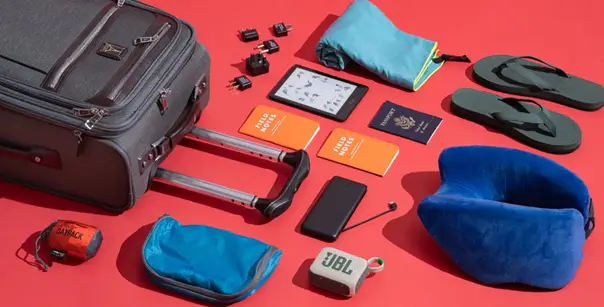
Ten years ago, a trip meant a suitcase and a passport. That stops being relevant when you are on the road full time. After about two years of it, the problem is no longer what you forgot at home — it is what quietly breaks mid-trip: a dead phone at check-in, dropped Wi-Fi, lapsed insurance, a frozen card abroad.
None of it seems dramatic at first. It only turns into a real problem when you are in an arrivals hall at 11 PM with no data and a dying phone.
Nearly ten years on the road across dozens of countries has reduced the best travel gadgets to a short, unglamorous list. It is not made out of the newest releases or the most photogenic gear on the market. It is built from what has actually, repeatedly prevented a bad day.
Each of the 13 items below addresses a completely different problem, so they are not ranked against each other. They are grouped by when those problems tend to surface on a real trip — starting with power and working outward toward money.
Power: Charging That Actually Keeps Up
Power is where a trip breaks first, and it is the cheapest category to get right. Two items cover almost everyone.
1. Power Bank
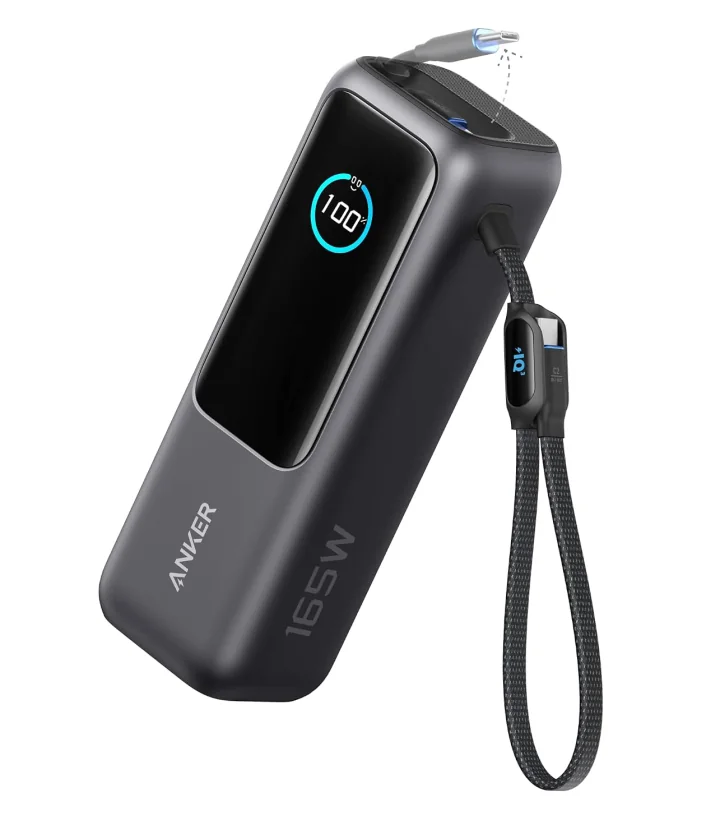
The single most-used item among the best travel gadgets in this kit, ahead of everything else by a wide margin. A dead phone in a new city — no map, no way to call for a ride — turns a minor delay into a genuinely stressful evening. After years of testing, two brands have consistently stood out: Anker and UGREEN, whose flagship power banks are similar enough that the real decision comes down to two numbers rather than the badge on the case.
Capacity is how many charges you have. A 25,000mAh bank gives you about seven full charges for an iPhone 16 Pro, which carries a battery of around 3,500mAh. A MacBook Pro 16" — roughly 9,000mAh — gets nearly three full charges from the same bank.
Wattage controls how quickly that charge happens. The MacBook Pro charges at 130W, so a 145W bank covers it easily, while anything near 60W can more than double the total charging time. That is a real problem when you have ten minutes at a gate.
- Sweet spot: 20,000–25,000mAh paired with 100W or more, which keeps weight reasonable without sacrificing speed.
- Price: both brands sit just under $100 in this range.
- The Anker difference: a built-in cable and a bigger screen — handy, but not strictly essential for most travellers.
- Ports to check: fast-charging USB-C plus at least one USB-A for the older accessories that still turn up in a typical bag.
- Airline rule: anything over 100Wh must fly in carry-on luggage, not checked baggage.
2. Power Adapter
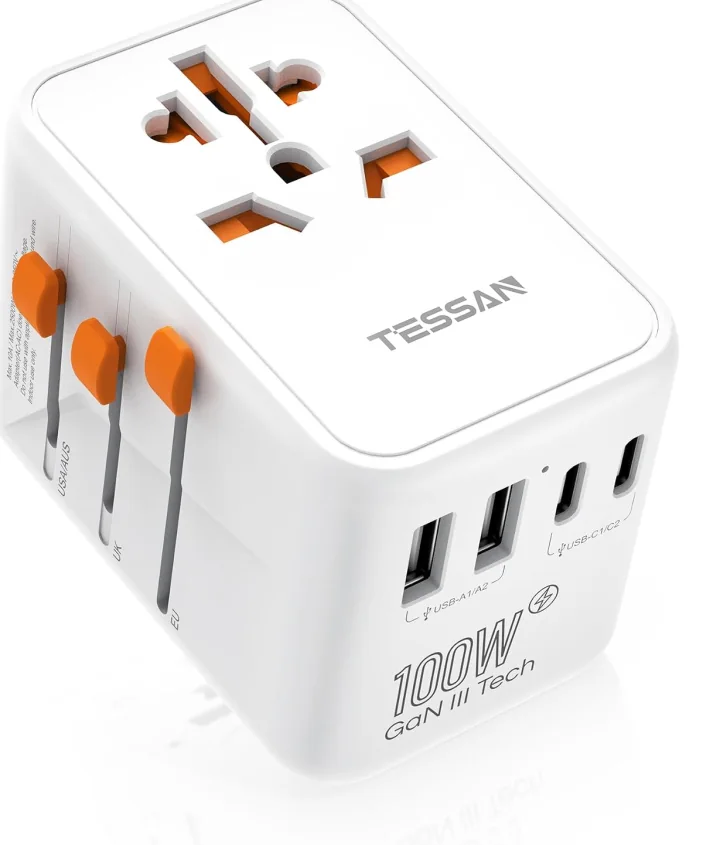
Every country has its own socket standard, and a hotel's loaner adapter is seldom a reliable backup. Buying a replacement in an airport shop solves the immediate problem, usually at three or four times normal retail. One of the best travel gadgets for frequent fliers, a single universal adapter eliminates that recurring cost for every future trip and every country visited. Two brands come up again and again — Lencent and Tessan — both with a good reputation for build quality across their ranges.
What really matters is the maximum rated power output printed on the box, not the brand name it carries.
- Target rating: 130W minimum, roughly what a MacBook Pro needs to charge at full speed away from home. 140W gives you that plus headroom for phones and accessories.
- Expected cost: $50–$60 for a model in that range. More than a plug-shape-only adapter, and worth it to avoid a laptop charging at half speed for an entire trip.
- Design detail: sliding-plug designs let you switch to the correct shape for whatever country you are in, rather than swapping the whole unit at every border.
The common mistake is buying the cheapest thing that fits the plug shape, then discovering weeks later that laptop charging has silently slowed to a crawl.
Connectivity: Data And Access Before You Land
Both items in this section have to be set up before departure. Neither can be fixed from the arrivals hall.
3. Mobile Internet (eSIM)
One of the most avoidable ways to start a trip badly is to arrive somewhere new with no data plan. No map, no ride-hailing app, no way to check the hotel's actual address on arrival. An eSIM ranks among the best travel gadgets for connectivity because it activates in seconds, before you have even left the jet bridge.
- YeSim — the choice of most travellers, with flexible packages for speed, data volume and region, and a really well-built app.
- Saily — Nord's own eSIM product, 5–10% cheaper on similar plans and slightly ahead on total country coverage, with a less polished app.
- Pangia Pass — worth a mention for heavier travellers: genuinely unlimited worldwide data across more than 122 countries, with no plan to pick. In parts of Africa where coverage is thin, a local eSIM can fill the gap.
Pricing and setup: Pangia runs $25–$30 a month, cheaper annually. Setup takes about a minute and needs no app beyond a single QR code scan.
Why it beats a local SIM: no language barrier at a kiosk counter, no photocopying a passport on arrival, and no chance of a shop running out of stock in a busy travel season.
Backup habit: do not delete the old eSIM after landing. Keep it installed as an instant fallback if the new one has trouble activating.
If you are heading somewhere specific, the Europe and Japan breakdowns go provider by provider.
4. VPN
Public Wi-Fi is not secure out of the box, but the bigger reason a VPN makes this list is access, not security. Some countries — China, Russia and the UAE among them — block certain websites and services outright. Install the app before you land, because app stores are often blocked once you are behind a restrictive border.
- NordVPN — the default pick for most travellers: widest server coverage, consistently competitive pricing.
- ProtonVPN — best for travellers who prioritise privacy and data protection over server count.
- Astrill VPN — the only one actually built to work within China's restrictions.
Rule of thumb: get your VPN running before you leave, never after you arrive somewhere restrictive.
- Second benefit: banking apps and streaming services that geo-restrict by region work normally on a home-country server.
- Everyday use: the small speed cost is worth it to run a VPN by default on public Wi-Fi in airports, cafés and co-working spaces.
- Auto-connect: set it to turn on automatically on any untrusted network, so you never have to remember before logging into a banking app.
- Server count vs location: a long list of servers matters less than having one in the specific region you are actually travelling through.
Health: Cover, Sleep And Recovery
Four items, and only the first one is an emergency. The other three decide how the other 360 days feel.
5. Health Insurance
The logic behind standard travel insurance is simple: you leave home for one to three weeks and come back. Introduce full-time travel and that assumption falls apart, because most policies were never written for it. Mainstream providers often stop covering travellers once they have been away past a fixed number of consecutive days.
Genki has just two plans rather than a maze of add-ons and coverage levels.
- Full plan ($300): covers pretty much everything, including dental, physiotherapy, psychotherapy and annual checkups.
- Lighter plan ($200): emergencies and sickness only, which is enough for most healthy travellers.
- Why we chose it: a straightforward German-based provider whose site is easy to understand before you sign up.
- Passport Card: a solid alternative we used for years, though the claims app was inconsistent.
What to check first: whether a policy resets or lapses after a set number of consecutive days away.
Claims process: as important as the list of coverages, because paperwork mailed to a home address is useless to a full-time traveller. The full insurance comparison goes deeper on both.

6. Probiotics
Gut stability is one of the most underappreciated variables in how a long trip actually feels day to day. More than 70% of the immune system sits in the gut, and stomach problems cost far more lost days than most travellers expect. New foods, unfamiliar water and constant time zone disruption all put real pressure on digestion.
- Pick: Seed, selected after trying dozens of other probiotic brands across nearly 10 years.
- Why we like it: an obvious, long-lasting difference over time from a high-potency formula.
- Also helps: probiotic-rich foods, which are far easier to find in Korea, Japan and other parts of Asia.
- Baseline habit: the daily capsule stays the same regardless of where a given trip ends up.
- Why the gut matters: it is the starting point for the flu-like symptoms and stomach bugs that most commonly derail trips.
- Timeline: benefits are cumulative, so consistency over weeks matters more than any single dose.
This is a general wellness recommendation, not medical advice — check with a doctor before starting any new supplement.

7. Blue Light Blocking Glasses
Sleep is one of the biggest levers on how a trip actually feels, and blue light plays a direct role in it. Blue light hitting the retina tells the body it is time to wake up and release cortisol. Screens do this constantly, and night flights make it considerably worse than a normal day.
- Lens colour matters: clear lenses block very little; fully red lenses block the most.
- The trade-off with red: it works extremely well, but it is not comfortable to look through for long periods.
- Best middle ground: orange lenses — meaningful blocking without making screens hard to read.
- When to wear them: evening screen time and night flights, not all day.
- Why night flights matter: cabin lighting and entertainment systems on most planes run heavy on blue light.
- The science in short: blue light mimics morning sun, stopping the body's natural shutdown signal.
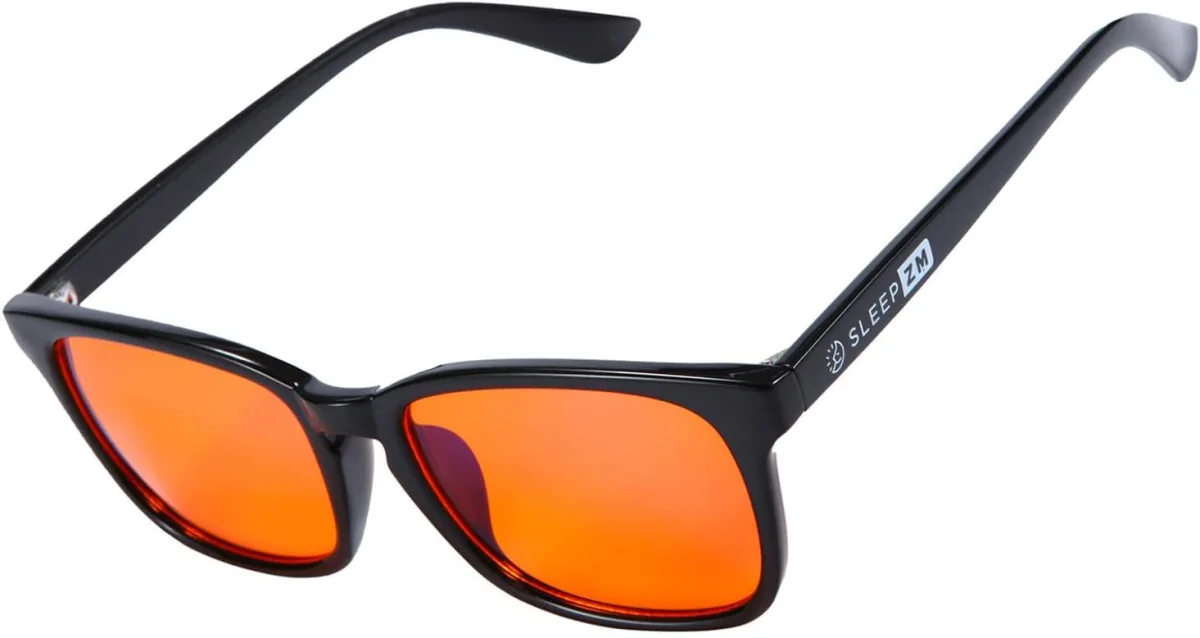
get the blue light glasses now
8. Magnesium
Magnesium supports recovery, deeper sleep and a long list of enzymatic processes throughout the body. Travel accelerates the loss of it through dehydration, poor sleep and constant time zone changes. The specific form matters more than most people realise.
- Best forms: magnesium glycinate, citrate or malate — specifically for sleep and recovery.
- Skip: the other forms, which mostly serve completely different purposes.
- When to take it: usually in the evening, as part of a regular wind-down routine.
- Pairs well with: the blue light glasses above, since both target the same evening sleep window.
- What it supports: dozens of enzymatic processes, plus muscle recovery after long walks or flights.
- Consistency matters: a single dose does little; the benefit builds with regular daily use.
This is a general wellness recommendation, not medical advice — check with a doctor before starting any new supplement.
Organisation: The Cable Problem
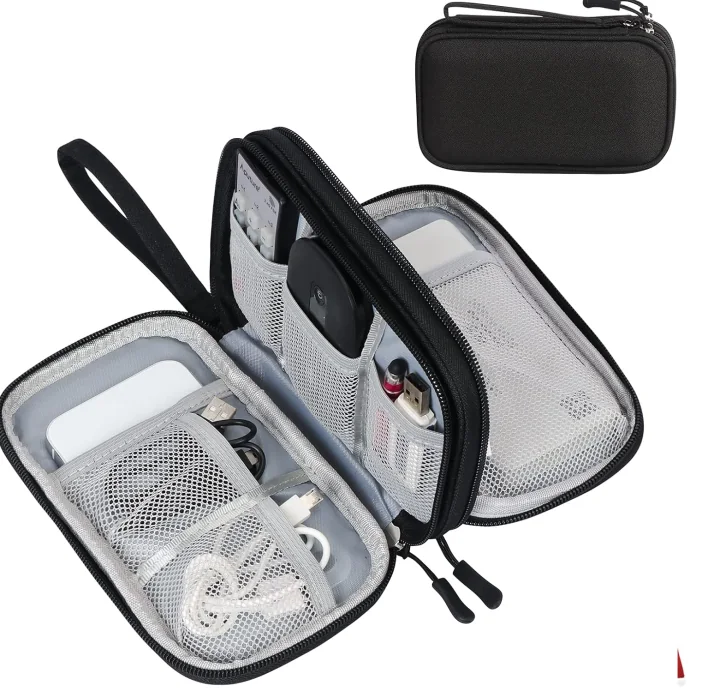
9. Cable Organizer
One of the best travel gadgets nobody talks about is a cable organizer. Every nomad accumulates the same pile over time: charging cables, plug adapters, dongles and a spare battery. With no dedicated case, that pile becomes a mess at the bottom of a backpack within weeks. You spend two minutes hunting for one cable, then unpack half the bag at security.
- Simple option: a Bellroy-style cable pouch — compact, minimal, does one thing well.
- Bigger collection: a cheaper alternative with more individual compartments suits a larger cable setup better.
- Who needs which: the simple pouch holds a phone charger and one cable; the bigger one holds a full desk kit.
- Time saved: everything has a designated spot, so packing and unpacking takes seconds rather than minutes.
- What to avoid: loose zip-top pouches with no dividers, since cables still tangle together inside them.
- Where it earns its keep: airport security lines, where a disorganised bag slows down the whole process.
Small but necessary — after a few months with a good one, it is hard to travel without it.
Money: Accounts And Cards That Travel
Both of these have to be opened before you leave. A frozen card is not something you fix from another time zone.
10. Fintech Banking
Traditional banks are built around a home address and a home currency, and both work against a full-time traveller. Cards get flagged for suspicious foreign transactions, and exchange rates often carry a hidden markup most people never see. A fintech-first account solves both problems by design rather than as an afterthought.
- Primary pick: Revolut — low foreign exchange fees, and the Revolut Ultra card for extra travel perks.
- Availability: varies wildly from country to country, so not everyone will have access.
- If it is not available: Wise is the widely used alternative, converting at the real mid-market rate.
- Golden rule: open the account and get the physical card before a trip starts, not mid-trip.
Running a US LLC? That is a separate need — the banking guide covers the options, including Mercury.
11. Credit Cards
Credit cards earn their place for frequent travellers through the full stack of perks, not basic payment convenience. Mileage collection, flight upgrades, lounge access and hotel or rental status all factor into the decision. It is a deep category in its own right, but the short version is simple.
- Primary pick: American Express Platinum (personal) — lounge access, mileage, hotel and rental status.
- Also included: built-in travel protection and insurance, depending on the specific card's terms.
- Note on eligibility: benefits differ by issuing country, so apply for whichever version you actually qualify for.
- Bonus overlap: the Revolut Ultra card, technically a metal debit card, also earns miles.
- Worth combining: a co-branded hotel-chain card, like a Marriott card, compounds the benefits over time.
- The maths: an annual fee pays for itself once lounge access and travel credits alone cover the cost.
- Backup, not primary: treat the credit card as a backup to your fintech account, not as the only way to pay.
Security And Comfort: The Last Two
The cheapest items on the list, and the two most likely to be skipped.
12. AirTag
The AirTag is easily one of the best travel gadgets for peace of mind, because lost or delayed luggage with no way to locate it is a genuine worst-case scenario. Drop one in a wallet, clip it to a keychain or hide it in checked luggage and the problem is cheaply solved. It runs on Apple's Find My network for real-time location almost anywhere in the world.
- Apple users: an AirTag, tracked continuously through the existing Find My network.
- Android and Samsung: Samsung's own SmartTag covers the same core use case.
- Best spots to use one: wallet, keychain, laptop bag and — specifically — inside checked luggage.
- Why it matters: it takes something that is "lost somewhere" and pins it to an exact, trackable spot within minutes.
- Airline claims: a tracked location makes a lost-luggage claim far stronger than guesswork.
- Battery life: the standard AirTag uses a replaceable coin-cell battery that lasts about a year.
- Network reach: Find My works off nearby Apple devices, not just your own, so coverage is genuinely worldwide.
- Quiet but useful: it never pings actively, so it does not drain your own phone while you travel.
13. Laundry Bag
The least glamorous item on this entire list, and one of the most obviously needed once you have travelled without one. You are always on the go, which means you are always collecting dirty laundry, and you have nowhere separate to put it unless you plan for it.
- The problem: clean and dirty clothes mixed in the same section of the suitcase.
- The fix: a simple, packable bag that keeps the two permanently separate.
- Bonus use: a discreet way to carry damp swimwear or shoes you have been wearing.
- What to look for: a breathable, water-resistant fabric that packs down small when not in use.
- Why it is worth it: a $5 item that quietly removes one daily annoyance you would otherwise repeat.
- Packing tip: for longer trips, the mesh version lets clothes breathe and reduces odour buildup in a closed bag.
- Where it goes: most nomads keep it in an outer pocket of a suitcase for easy daily access.

Quick-Reference: The Best Travel Gadgets At A Glance
| # | Essential | Category | Where to get it |
|---|---|---|---|
| 1 | Power Bank | Power | Amazon |
| 2 | Power Adapter | Power | Amazon |
| 3 | Mobile Internet (eSIM) | Connectivity | YeSim · Saily |
| 4 | VPN | Connectivity | NordVPN |
| 5 | Health Insurance | Health | Genki · Passport Card |
| 6 | Probiotics | Health | Seed |
| 7 | Blue Light Blocking Glasses | Health | Amazon |
| 8 | Magnesium | Health | Form guide |
| 9 | Cable Organizer | Power | Amazon |
| 10 | Fintech Banking | Money | Revolut · Wise |
| 11 | Credit Card | Money | Amex Platinum |
| 12 | AirTag | Security | Amazon |
| 13 | Laundry Bag | Comfort | Amazon |
Buying Tips: What To Look For In The Best Travel Gadgets
- Balance power bank capacity against wattage. Look for 20,000–25,000mAh with 100W or higher output.
- Check an adapter's wattage rating, not just its plug shape. Below 130W, laptop charging noticeably slows.
- Install a VPN before landing, not after. Once you are in a restrictive country, app stores are often inaccessible.
- Battery carry-on rules apply regardless of size. Anything over 100Wh has to go in carry-on, and most airlines ban anything at 160Wh or more.
- Treat supplements as a daily habit, not a medical treatment. Talk to a doctor before starting anything new, especially if you take other medication.
- Compare fees on banking and cards, not just headline rates. Check fintech eligibility by country and keep a backup like Wise in mind.
- Card perks differ significantly by country of issue. Apply for the version you are actually eligible for, not the one with the best terms on paper.
- Read renewal terms on insurance as carefully as coverage terms. A policy that looks comprehensive on day one may quietly reset or stop covering ongoing conditions.
- Keep a physical backup for every digital-only account. A frozen app or a dead phone should not mean losing access to money, data and insurance all at once.
Conclusion
None of these 13 essentials are exotic, and that is by design. The best travel gadgets still in consistent rotation after nearly 10 years of full-time travel all have one thing in common: each quietly eliminates a specific recurring point of failure before it becomes a problem. A dead phone, no data on arrival, a blocked site, a denied claim, a declined card — all avoidable with the right setup beforehand.
The honest way to build your own version of this list is to start with what went wrong on a previous trip. If you have had the dead phone problem, start with power and work outward. If you have ever had a real scramble abroad with a frozen card, start with money instead. Once you close that first gap, the rest tends to fill in naturally. Within a trip or two, it stops feeling like a packing list and starts to feel like how travel just works.